
Your own photos,
studio quality.
Take a product's own photo into Sous Studio and see it as if shot in a studio, on a restaurant table or in a kitchen. The dish stays exactly as it is; only its surroundings change. Turn the same photo into a six-second product video and add it to your menu in one tap.
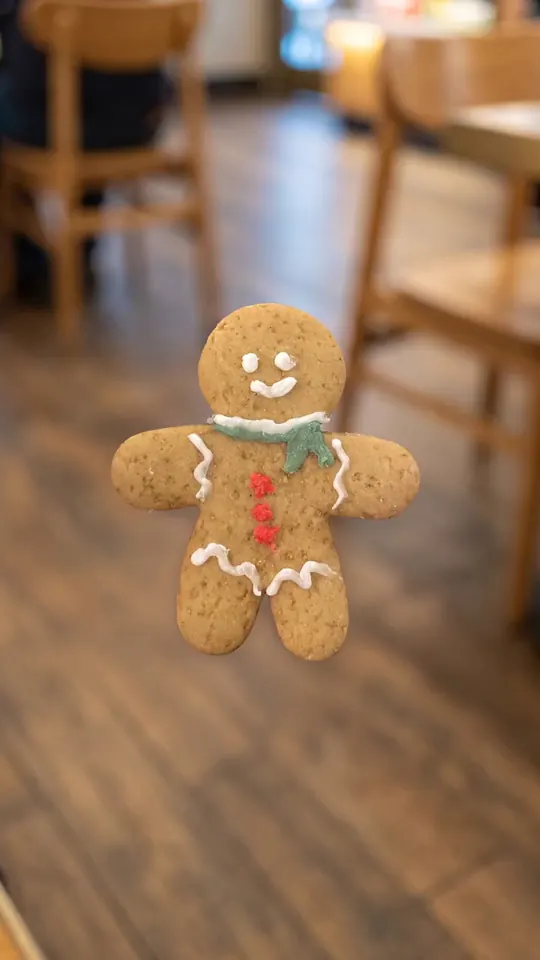 Sous Studio· Slow push-in
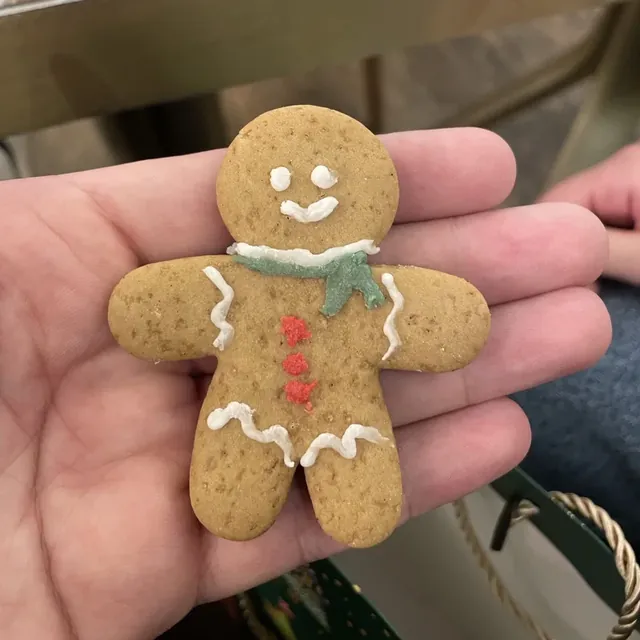 Original
From one photo
to a video on your menu.
The cookie was photographed in someone's hand and went on the menu like that. Sous Studio makes a six-second video from that same photo: the cookie stays as it is, the hand goes, a café appears around it and the camera moves slowly towards it. It plays when a guest opens the menu.
Take a product into the studio
On the Menu tab, Sous Studio puts first the products whose photo is worth renewing. Take the cookie into the studio and switch to Video.
Pick the movement
The source is the product's own photo. Pick one of four camera moves; the price shows before anything is made, and if no video comes out your credits are refunded.
The frame, then the video
Sous first moves the photo into an upright frame; the cookie stays the same and its surroundings change. A six-second silent video is usually ready in a minute or two.
Play it on the menu
Press Add to menu and the video starts playing under Products with video on your QR menu.
Refresh your menu without
waiting for a photographer.
Most menu photos are taken on a phone between services. Sous Studio starts from those photos, so there is no studio to set up and no shoot to book.
A photographer and a shoot dayLights, backdrops and propsFilming and editing a videoA new shoot every time a product changes
- Two options from the product's own photo
- Studio, tabletop, kitchen, dark and overhead styles
- A six-second upright video with 4 camera moves
- The product's photo or menu video in one tap
An image generation is 450 credits, a video 850. If nothing can be made, your credits are refunded.
What guests see
is what reaches the table.
Sous Studio makes your menu look better without changing the food. There are checks at every step to keep it that way.
Only the surroundings change
The portion, the ingredients, the plate and the logo on a can stay as they are; the backdrop, the light, the surface and a few props are what change.
The photo is checked first
If a photo is too dark, too blurry or not food at all, Sous says so before any credits are taken.
Every option is compared with the original
An option that doesn't show the same dish is made once more, and dropped if it still doesn't.
Nothing goes live until you pick it
You choose one of the options; the ones you don't pick are never shown to guests.
Refunded if nothing comes out
If no image or video can be made, the credits spent are given back automatically.
In a video, only the camera moves
It pushes in, turns or lets steam rise; nothing touches, pours or cuts the food, and nobody appears in the frame.
Without leaving
the Menu tab.
Sous Studio is on the Menu tab in Cibusy POS and in the Crew app.
Take a product into the studio
On the Menu tab, Sous Studio puts first the products whose photo is worth renewing. Pick one or find it by name.
Pick a style or a move
Choose one of five styles for an image, or one of four camera moves for a video. You see the price before anything is made.
Add it to your menu
The image you like becomes the product's photo and the video plays on your QR menu. What you didn't pick stays on the product page for 30 days.
An image generation is 450 credits and gives two options; the monthly Sous credits included in every plan can pay for it. A six-second video is 850 credits and is paid with purchased credits only. The price shows on screen before anything is made, and if no image or video can be made, your credits are refunded.
No. Sous Studio always starts from the product's own photo and never draws food from a description, so the menu shows the plate that reaches the guest's table. A sharp photo taken on a phone is enough.
No. The portion, the ingredients, the plate and the logo on a can stay the same; only the backdrop, the light, the surface and a few props change. Every option is compared with the original, and one that does not show the same dish is made again or dropped. You decide which one reaches the menu.
A photo taken from the side doesn't show the top of the dish; an overhead shot would have to draw it again, and that would not be your plate. For the same reason the top-down spin video needs a photo taken from above, and the steam video is made only for items served hot. A photo that doesn't fit is refused before any credits are taken.
A six-second, upright (9:16), silent product video. You pick one of four moves: slow push-in, orbit, steam or top-down spin. It is usually ready in a minute or two, and once added it loops on your QR menu.
Yes. You can make 3 image generations during the trial. Videos are paid with purchased credits only, so on the trial you make one by topping up.
A venue can make 20 image generations and 10 videos a day.
Yes. On Crew's Menu tab, staff with access to Sous and menu management can take or pick a product's photo and open it in Sous Studio. Credits are topped up from the venue account.
Give your menu photos
a fresh look today.
Your free trial includes 3 image generations. Sous Studio is waiting on the Menu tab in Cibusy POS and Crew.